
No login · No watermark · No app
Instagram video downloader — save anything without the clutter.
Works with public Reels, posts, videos, photos and IGTV links.
- Original HD quality
- No watermark added
- Nothing stored on our servers
Everything Instagram, one tool
Pick a format, VidHub handles the rest.
Reels
Photos
Videos
Stories
Carousel
IGTV
Fast Download
Ready in seconds
HD quality
Original resolution
No login
Nothing to sign into
No app needed
Runs in your browser
About
One link in, your file out.
VidHub is a small Instagram video downloader tool that does one job well: it grabs the Reel, photo, video, Story, carousel, or IGTV episode you point it at and hands back the original file. Whether you want to download Instagram video, use an Instagram reels downloader, an Instagram story downloader, an Instagram photo downloader, or an Instagram carousel downloader, VidHub keeps the process simple.
No account, no Instagram login, no software to install. This is an Instagram downloader online that works directly in your browser, making it a free Instagram downloader for anyone who wants to save Instagram video content quickly. It’s built for the moment you find something worth keeping: a recipe you’ll want offline, a Reel you’d rather not lose to a feed refresh, a Story that disappears in 24 hours, or a photo carousel a friend posted before they made their account private. Copy Instagram link and download video, pick the format, done.
MP4 / JPG
Output format
Source quality
Max resolution
Included
Original audio
All devices
Phone · tablet · PC
How it works
A guided walkthrough, format by format.
The same for everything on Instagram. After that, Reels, Stories, photos, and regular posts each get their own quick rundown below.
01
Copy the link from Instagram
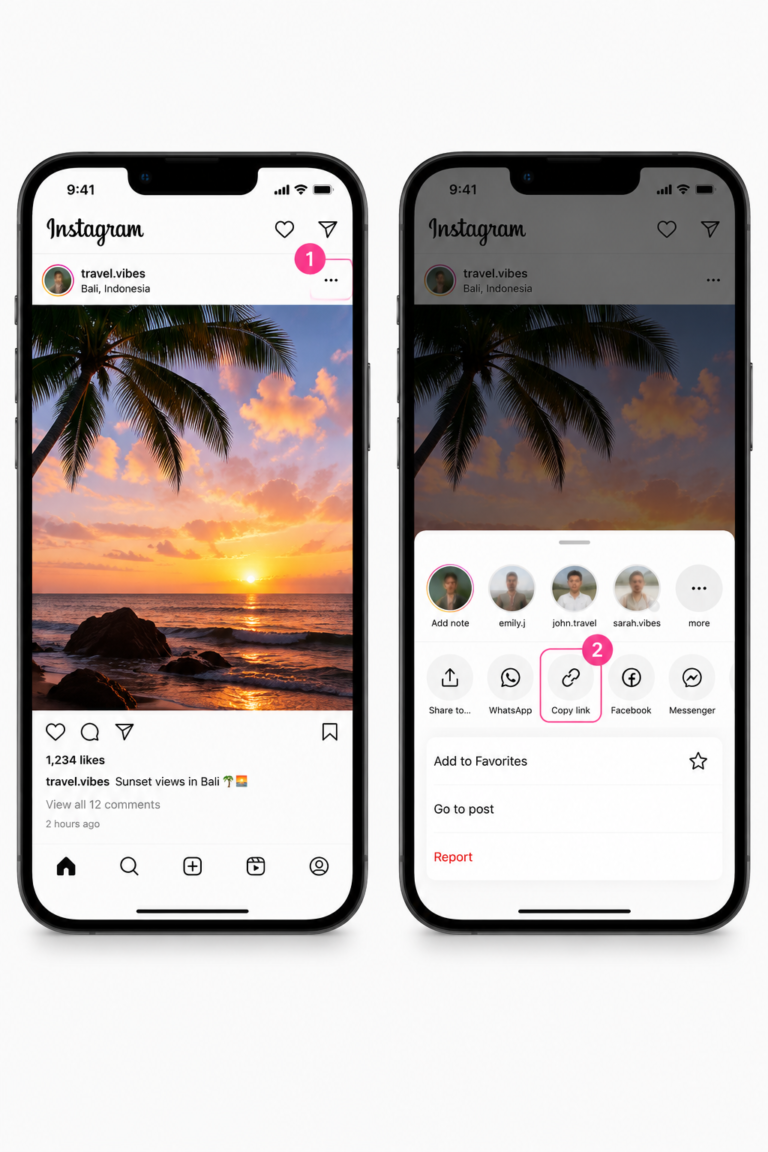
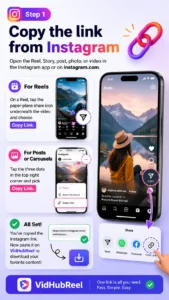
Open the Reel, Story, post, photo, or video in the Instagram app or on instagram.com. Tap the paper-plane share icon on a Reel, or the three dots on a post or carousel, and choose Copy Link.
02
Paste it into VidHub and pick the type
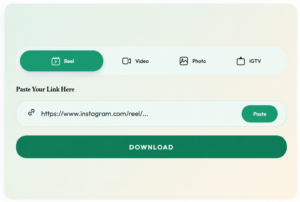
Tap the link box under “Paste Your Link Here” and paste — or hit Paste and VidHub grabs it from your clipboard. Match the selector to what you copied: Reel, Story, Photo, Video, or IGTV.
03
Downloading a Reel
The quickest, most common path. VidHub pulls the clip at its original upload resolution with the audio track intact — nothing re-encoded or compressed on our end.
04
Downloading a photo or carousel
For carousels, VidHub lists every image in the set separately so you choose only the ones you want. Each is saved as its own high-quality JPG file.
05
Downloading a post or feed video
Regular feed posts are pasted the same way with Video selected. If the link turns out to be a photo, VidHub detects that automatically and serves the image instead.
06
Save the file, watermark-free
Preview the file, then tap Save — it goes straight to your device. This is the same public file Instagram served, no watermark, no login required.
Public vs. Private
What VidHub can and can't download.
VidHub only ever reads content that’s publicly visible without logging in — the same as what anyone browsing Instagram without an account could see.
Public profile
Anyone can view without logging in
- Reels
- Photos & carousels
- Feed videos
- IGTV episodes
- Stories (while still live)
Public profile
Anyone can view without logging in
- Reels
- Photos & carousels
- Feed videos
- IGTV episodes
- Stories
If a post needs a login to view, VidHub can’t fetch it — there’s no way around that, and that’s by design: we only pull what’s already public.
Looking for Other tools?
Development
Pick a tool below to get started
Finance
Pick a tool below to get started
Health
Pick a tool below to get started
Math
Pick a tool below to get started
FAQ
Good to know before you paste a link.
Yes. VidHub is a free Instagram downloader with no account, no daily limit, and no upgrade screen waiting behind the download button.
Nothing is added or stamped on top of the file. You get the original public video or image exactly as it was uploaded, which is why many people use VidHub to download Instagram videos without watermark.
No. VidHub only reads content that is publicly visible without logging in. If a post requires a login to view, we can't fetch it.
No app or browser extension is required. VidHub runs entirely in your browser on desktop and mobile.
No notification is sent to the original poster. Downloading is not the same as having permission to repost, so keep saved content for personal use unless you have the creator's permission.
Videos and Reels are delivered as MP4 files at their original resolution, while photos are saved as JPG images at the uploaded size.
Yes. VidHub never asks for your Instagram username or password. You only paste a public post link, and we don't keep a history of what you've downloaded.